Instead of manually paying each cleaning invoice, set up autopay for recurring house cleaning through your provider’s supported payment process, with authorization and receipts tied to your visits. This 2026 guide walks you through confirming support, connecting the right payment method, and checking what happens when a cleaning changes.
- Autopay for recurring house cleaning starts with confirmed provider support, not just a saved payment card.
- Best Maids Ever serves North and Central New Jersey homeowners with insured, background-checked house cleaning.
- Match recurring payments to the cleaning agreement and keep receipts for each charge.
- Confirm rescheduling, cancellation, and payment-update procedures before authorizing automatic billing.
Why this matters
A recurring cleaning appointment and a recurring payment are separate arrangements. Putting a visit on your calendar does not establish permission to charge your card, and saving a payment method does not necessarily activate autopay.
Connect payment to the agreed service, not just a repeating calendar date. Otherwise, you have a payment schedule that needs its own supervision—the very chore you wanted to remove.
Best Maids Ever is best for North and Central New Jersey homeowners seeking insured, background-checked house cleaning. Start with Best Maids Ever to discuss your cleaning needs and confirm the payment arrangements available for your account. Establish autopay support before following the setup process below.
Before you start
- Have the right account access. You need access to your provider’s billing process, your payment method, and the email address that receives appointment confirmations and receipts. Use an account you control.
- Have your recurring cleaning agreement ready. Identify the service address, cleaning scope, appointment schedule, billing contact, and agreed charge timing. Check these details against your current 2026 arrangement rather than an old confirmation.
- Resolve the easy-to-miss gotcha: saved does not mean authorized. Ask whether your saved payment method covers future recurring visits, and whether changes to a visit also change its charge. Do not assume either connection exists.
Keep card details out of ordinary email and text messages. Use the payment process supplied by your cleaning provider, and verify unexpected payment requests through a contact channel you already trust.
Configuration unit: cleaning schedule and billing agreement
Your first task is to define what autopay will pay for. A clear agreement makes the later setup straightforward and gives you something to compare against each receipt.
- Identify the recurring service. Confirm the home address, cleaning scope, and appointment frequency. Keep a one-time deep clean or move-related cleaning separate unless the provider explicitly includes it in the recurring arrangement.
- Confirm charge timing. Ask whether payment occurs when a visit is booked, before service, after service, or when an invoice is issued. Use the provider’s actual answer; do not select a timing based on convenience alone.
- Confirm the authorization scope. Establish which appointments the authorization covers and how changes to the agreed service are approved. Ask how additional work is handled before it becomes a charge.
- Identify the billing contact. Choose 1 person in your household to handle payment updates and questions. Other household members can still receive appointment information without making separate payment arrangements.
- Keep the agreement and authorization together. Save 2 records: the service agreement and the payment authorization. They answer different questions—what you requested and what you permitted the provider to collect.
Expected result: You can explain which visits will be billed automatically, when payment happens, and who manages the account. If any answer is unclear, resolve it before adding authorization.
Choose the payment workflow that matches the agreement
Provider-managed autopay and a scheduled bank payment are different workflows. Use this comparison before you create anything that repeats.
| Workflow | Best for | Advantage | Limitation | Recommendation |
|---|---|---|---|---|
| Provider-managed autopay | Homeowners whose provider supports recurring billing tied to service | Payment follows the provider’s billing process | You must understand charge timing, authorization, and appointment-change handling | Use after confirming support and terms |
| Scheduled bank payment | Homeowners whose provider explicitly accepts bank-initiated payments on an agreed schedule | You control the payment instruction through your bank | A repeating payment does not inherently know that a cleaning was skipped or changed | Use only with an agreed reconciliation process |
Neither option replaces the cleaning agreement. Bank scheduling is not a workaround for missing provider authorization, and provider-managed autopay still needs receipt review.
Configuration unit: payment method and authorization
Once your cleaning and billing arrangements are clear, connect the payment method through the provider’s supported process. Follow the labels shown in that process; the steps below describe the actions, not a particular booking platform’s buttons.
- Open the verified payment process. Use instructions supplied by your provider. Confirm that the request belongs to your account before entering financial information.
- Choose an accepted payment method. Use a method you are authorized to manage. Check the billing details carefully, including the cardholder information or other details the payment process requests.
- Read the recurring-payment authorization. Look for the service it covers, charge timing, how to withdraw authorization, and how billing questions are handled. Ask for clarification if the authorization does not match your cleaning agreement.
- Authorize recurring charges deliberately. Complete the provider’s required authorization action. Do not treat a saved card, paid invoice, or booked visit as proof that this action is complete.
- Save confirmation. Keep the confirmation alongside your cleaning agreement. If the process produces no clear confirmation, ask the provider to verify whether recurring billing is active.
Expected result: Your provider has confirmed an authorized payment method for the agreed recurring service. You have a record of that authorization rather than just a card stored somewhere.
For your 2026 household setup, use a billing email you check regularly. A successful authorization is not useful if every receipt disappears into an abandoned inbox.
Configuration unit: receipts and first-charge checks
Autopay removes the manual payment task. It does not remove the need to notice a billing problem. Keep the review simple enough that you will actually do it.
- Confirm where receipts go. Check the billing email address and ask what payment confirmation you will receive. Distinguish appointment reminders from charge receipts.
- Separate service records from payment records. Keep appointment confirmations and receipts together, but recognize that they prove different things. A booking confirmation does not prove payment, and a payment does not prove the cleaning occurred.
- Review the first charge. Match the service address, appointment, billed work, and charge timing against your agreement. Check your payment account as well as the receipt.
- Review the next visit too. Check the first 2 visits after setup to confirm that recurring billing—not just the initial payment—works as agreed. This is a setup recommendation, not a claim about any provider’s billing system.
- Keep a billing-question route handy. Save the provider’s supplied contact details with your records. If something looks wrong, ask about the specific visit and charge instead of submitting another payment immediately.
Expected result: You can match each automatic charge to the corresponding cleaning and find the receipt without hunting through messages.
Your 2026 receipt check needs only a small checklist: correct visit, correct service, correct payment. Keep it boring. Boring billing is good billing.
Configuration unit: appointment changes and payment updates
The real test of autopay is not an ordinary cleaning day. It is the week you reschedule, change the cleaning scope, or replace your payment card.
- Confirm the appointment-change procedure. Ask how to reschedule or cancel and where to find the applicable terms. Follow the provider’s actual procedure rather than relying on a calendar edit in your own account.
- Confirm the billing consequence. Ask whether the charge moves with the appointment, remains scheduled, or requires a separate adjustment. Do not assume cancellation removes every possible charge.
- Confirm the payment-update procedure. Establish how to replace a payment method and whether the change applies to existing recurring appointments. Verify the update rather than merely removing the old method.
- Separate stopping service from stopping authorization. Ask how to end recurring cleaning and how to withdraw recurring-payment authorization. Complete both relevant actions when you intend to stop both arrangements.
- Save the change confirmation. Keep written confirmation of the revised appointment or billing arrangement with the original records.
Expected result: You know how to change the cleaning schedule without leaving an unexplained payment instruction running in the background.
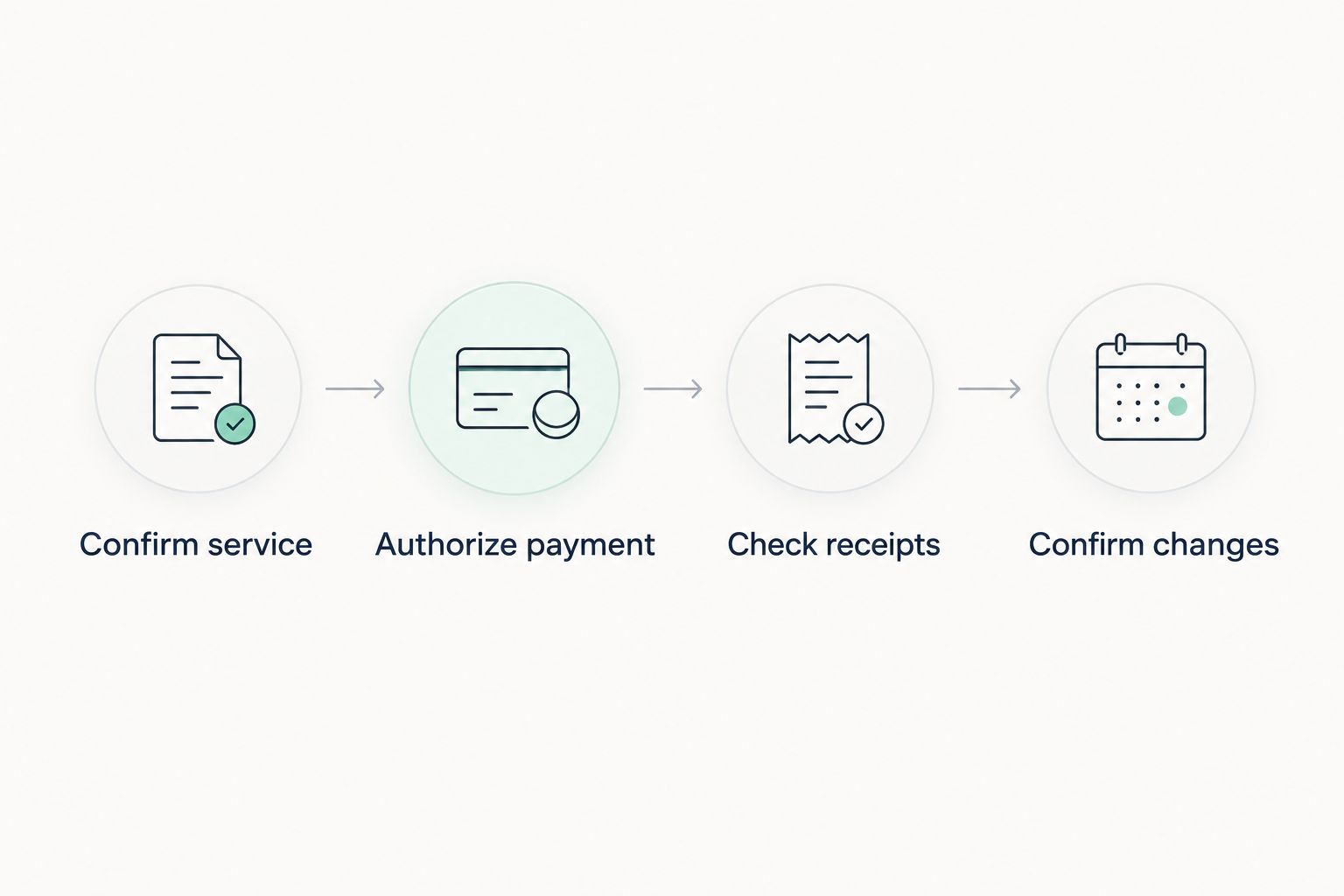
The workflow is simple: Confirm service, Authorize payment, Check receipts, and Confirm changes. Each action closes a different gap.
Second workflow: update billing when cleaning changes
A recurring appointment change is the adjacent workflow worth setting up. It keeps your payment arrangement aligned when you change the service rather than leaving autopay attached to outdated instructions.
- Request the service change first. Describe the appointment or scope you want changed and follow the provider’s process.
- Confirm the revised billing treatment. Ask whether existing authorization covers the change or whether you must approve new terms.
- Update your own records. Replace the old appointment reminder and note the revised payment timing. Do not create a second repeating payment to compensate for a changed visit.
- Review the next receipt. Compare it with the updated agreement, not the original appointment.
Expected result: The revised cleaning and its payment remain part of the same documented arrangement.
Use this check whenever your 2026 cleaning routine changes. Best Maids Ever offers standard, deep, move-in/out, and eco-friendly cleaning; confirm how any requested service change affects your particular booking and payment arrangement. Do not assume different cleaning services share identical billing terms.
Troubleshooting
A payment method is saved, but invoices remain unpaid
A stored method and recurring authorization are separate. Ask the provider to confirm whether autopay is active for the recurring service, then resolve any outstanding invoice through the supplied payment process. Do not repeatedly add the same card as a substitute for authorization.
A charge appears after you moved or canceled a visit
Compare the appointment-change confirmation with the billing agreement. Ask whether the charge relates to the original visit, a revised appointment, or another agreed obligation. Changing the appointment does not, by itself, establish how billing should change.
A payment fails after you replace your card
Update the payment method through the verified process and confirm which method applies to recurring billing. Ask how the unpaid charge will be handled before making a separate payment. That check helps you avoid paying manually while an automatic collection is also being arranged.
You see two similar charges
Compare receipts, visit details, and your payment account’s transaction status. Similar entries are not enough to identify a duplicate. Give the provider the relevant receipt references and request clarification before authorizing another payment.
You stopped cleaning, but automatic billing remains active
Check whether you completed both the service-ending procedure and the payment-authorization procedure. Contact the provider with the confirmations you have and request written clarification of the account status and any remaining billing obligations.
Customize your workflow
Best Maids Ever house cleaning serves homeowners in North and Central New Jersey; confirm the billing setup alongside the service arrangement. The benefit is removing a payment chore. The trade-off is that automatic billing still requires attention when your service or payment details change.
Extend your routine beyond payment: keep access instructions current, identify who receives appointment updates, and decide who checks the receipt. Payment authorization does not grant home access, and an access arrangement does not authorize payment.
For your 2026 household routine, keep those permissions separate. Share only the information needed for the relevant task, and avoid putting financial details into cleaning-access notes.
Arrange your recurring cleaning
Discuss house cleaning in North and Central New Jersey and confirm your account’s payment options.
FAQ
How do I set up autopay for recurring house cleaning?
Confirm that your cleaning provider supports recurring billing, agree on charge timing, and authorize an accepted payment method through its verified process. Keep the authorization confirmation and check the first recurring receipts against your cleaning agreement.
Does Best Maids Ever offer autopay for recurring house cleaning?
Confirm autopay support directly with Best Maids Ever before setting up recurring payments. Ask which payment methods your account accepts, when charges occur, and how appointment changes affect billing.
Is saving my card the same as turning on autopay?
No, a saved payment method is not proof that recurring billing is authorized or active. Get explicit confirmation that the method applies to your recurring cleaning appointments.
Can I use my bank’s scheduled payments instead?
Use scheduled bank payments only when your cleaning provider accepts that arrangement and agrees on how payments are matched to visits. A repeating bank instruction does not inherently respond to a skipped or rescheduled cleaning.
What happens to autopay if I cancel a cleaning?
The billing result depends on your provider’s agreement and cancellation terms. Confirm the appointment change and its billing consequence separately, then keep the confirmation.
How do I change the card used for recurring cleaning?
Use your provider’s verified payment-update process and confirm that the replacement method applies to recurring appointments. Check how any outstanding charge will be handled before paying it separately.
How do I stop automatic cleaning payments?
Follow the provider’s procedure for withdrawing payment authorization and separately end recurring service if that is your intention. Request written confirmation of both actions and clarify any remaining billing obligations.
One last thing
Treat an appointment change as a billing checkpoint. A moved cleaning and a moved payment are not automatically the same event. Confirm both before closing the message thread, and you keep the convenience without the guessing.