
Instead of manually copying every Airbnb checkout into your cleaning schedule, subscribe to the listing’s exported calendar and use each departure to prepare a confirmed cleaning task. For airbnb calendar sync cleaning turnover in 2026, use the calendar feed for dates—not as proof that a cleaner has accepted the job.
- Airbnb calendar sync cleaning turnover starts with an exported calendar feed and a separate, confirmed cleaning task.
- Google Calendar subscriptions show reservation dates; they do not assign cleaners or confirm appointments.
- Best Maids Ever provides insured, background-checked cleaning in North and Central New Jersey; confirm the requested scope directly.
- Use checkout dates, local time, and cleaner acceptance to build a dependable turnover schedule.
Why this matters
A reservation answers when a guest stays. A cleaning task answers who will prepare the property, when they can enter, and what they need to finish. Those are different records, even when they appear on the same calendar.
Best Maids Ever is best for North and Central New Jersey homeowners seeking insured, background-checked house cleaning. When you arrange cleaning with Best Maids Ever, confirm the property, appointment, and requested tasks directly. A calendar subscription alone does not book the service.
For your 2026 workflow, keep Airbnb as the source of reservation dates and maintain a separate cleaning schedule. That separation lets you move an appointment without accidentally changing the guest’s stay. It also gives you somewhere to record acceptance and completion—details an exported reservation feed does not provide.
Before you start
- Get listing access and a destination calendar. You need permission to view the Airbnb listing’s calendar settings. This guide uses Google Calendar on a computer for the subscription setup.
- Prepare the cleaning brief. Record the property identifier, checkout time, next check-in deadline, access method, and agreed cleaning scope. Ask the cleaner how they accept appointment requests and report completion.
- Expect a read-only, periodically refreshed feed. An iCalendar subscription is not an instant dispatch system. Blocked dates also need interpretation, and an all-day reservation entry does not supply your cleaning appointment’s start time.
Treat the exported calendar address as private. Share it only with people or systems that need reservation visibility, and keep door codes out of calendar descriptions accessible to a wider group.
Choose your scheduling method
Both approaches below support turnover planning, but neither removes the need for cleaner acceptance. Pick the method that matches how you currently coordinate appointments.
| Method | Best for | Advantage | Limitation |
|---|---|---|---|
| Airbnb feed subscribed in Google Calendar | Hosts who want reservation visibility beside their cleaning schedule | Keeps the imported reservation calendar separate from editable cleaning appointments | Refresh timing depends on the receiving calendar; imported events do not assign cleaners |
| Manually maintained cleaning calendar | Hosts who coordinate directly with a cleaner | Lets you record appointment times, acceptance, and scope explicitly | You must update cleaning entries when reservations change |
Use the Airbnb feed for visibility and the cleaning calendar for commitments. These methods work together rather than competing. The subscription reduces date copying; the separate appointment records the work someone has actually agreed to perform.
Airbnb calendar export
Start with 1 listing during setup. Confirm that its feed and cleaning schedule behave as intended before repeating the process for other properties.
- Open Airbnb in your hosting account and select Calendar.
- Select the listing whose departures you want to track. Check the listing name before continuing, especially when properties have similar names.
- Open Availability, then Connect calendars.
- Find the Airbnb calendar export link and select Copy beside it. You want the link that shares Airbnb’s calendar outward, not the field used to import another website’s calendar into Airbnb.
- Keep the copied address private while you add it to your destination calendar. Do not paste it into public documents or guest-facing instructions.
Airbnb’s exported feed is an iCalendar address, often called an iCal link. It provides calendar information to the receiving application; it is not a cleaning order, a messaging channel, or an editable copy of the reservation.
Expected result: You have the export address for the correct listing. You have not changed a reservation or created a cleaning appointment.
If your account presents a different layout in 2026, follow the calendar-connection controls within the listing’s availability settings. Keep the direction straight: export from Airbnb, subscribe in the calendar where you plan cleaning.
Google Calendar subscription
Use Google Calendar in a desktop browser to add the feed. Keep the imported reservation calendar distinct from any calendar you share for cleaning appointments.
- In Google Calendar, find Other calendars in the left sidebar and select the plus button.
- Select From URL.
- Paste the Airbnb export address into URL of calendar.
- Select Add calendar.
- Open the imported calendar’s settings and give it a clear name that identifies the property and its reservation purpose. For example, use your own property nickname followed by Airbnb reservations.
- Review a known reservation against Airbnb. Compare its arrival and departure dates, rather than assuming the event’s visual position represents a cleaning time.
Expected result: Airbnb reservation entries appear on a separate calendar in Google Calendar. You can show or hide that calendar without deleting your cleaning appointments.
Do not use a one-time file import when you want an ongoing subscription. Importing a downloaded calendar file copies its contents at that moment; subscribing to the calendar address lets the receiving application retrieve later changes.
Before using the feed operationally in 2026, review 3 checks: the correct listing, a known departure date, and the calendar’s time zone. Use the property’s local time for cleaning appointments in New Jersey, particularly if you manage the listing while traveling.
Cleaning task setup
Now turn reservation visibility into an appointment someone can act on. Keep this process deliberately simple: identify the departure, create the task, request acceptance, and record completion.
- Create a separate calendar for cleaning appointments, or use your existing task system. Give every task a property identifier so nobody has to guess which address it belongs to.
- Read the guest’s departure date from Airbnb and verify the actual checkout time against the reservation instructions. Do not treat the first day of the stay as the cleaning date.
- Create an editable cleaning appointment after checkout. Record the next guest’s arrival deadline separately; an empty calendar gap does not establish a promised check-in time.
- Add the agreed cleaning brief: property, appointment window, rooms, linen arrangements, supplies, and how to report damage or unfinished work. Share access instructions through the channel you have agreed with the cleaner.
- Send the appointment request through the cleaner’s normal booking or communication process. Mark it as requested until the cleaner explicitly accepts it.
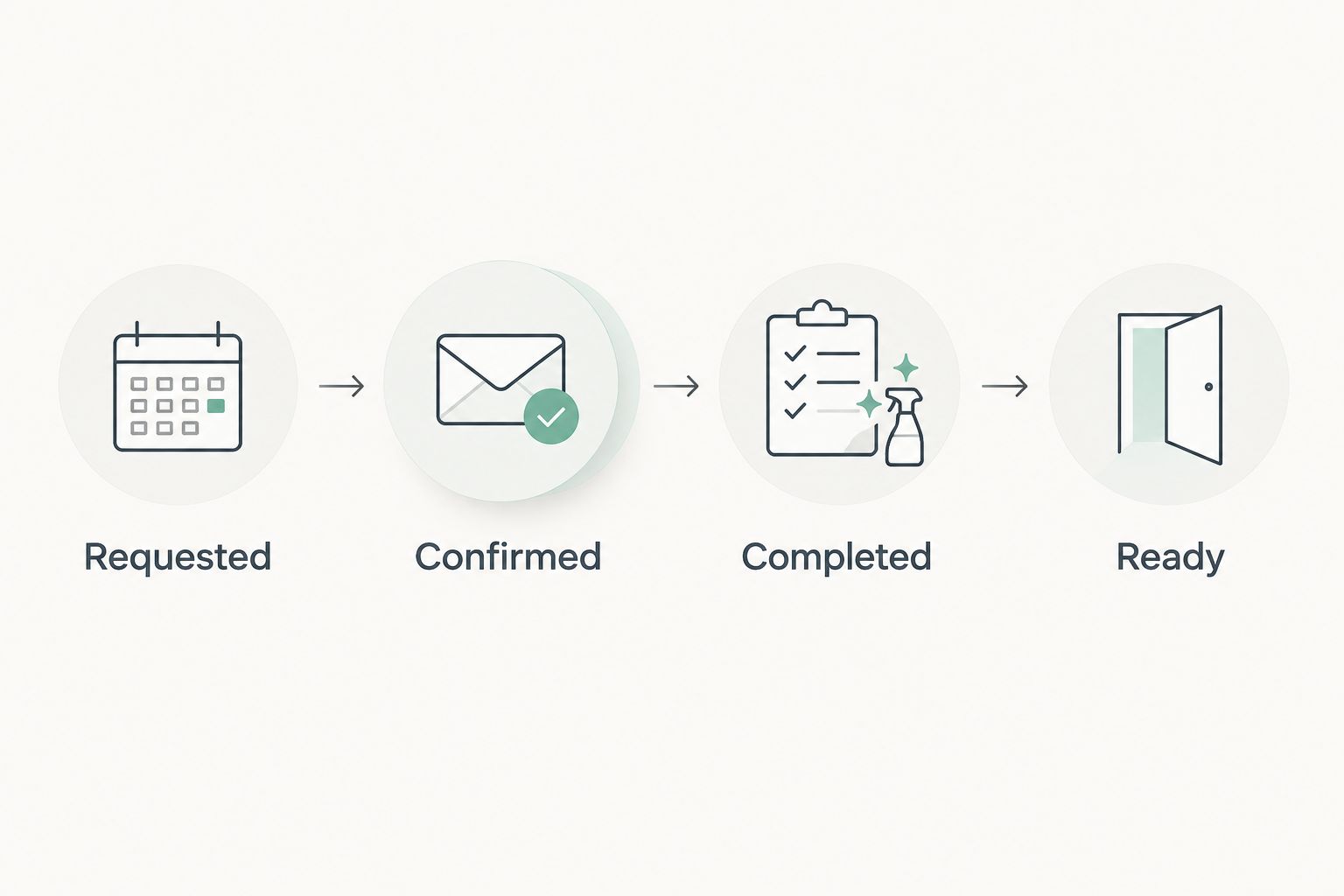
- After acceptance, mark it confirmed. After the visit, record completion and any unresolved issues before marking the property ready.
Expected result: You have a cleaning appointment with a responsible person, an agreed time, and a defined scope—not merely a reservation visible on another calendar.
Use these status labels consistently: Requested, Confirmed, Completed, and Ready. Completed means the cleaning work has been reported finished. Ready means you have also checked the remaining arrival requirements.
For the room-by-room brief, use the turnover cleaning guide for Airbnb hosts. Keep booking dates in the calendar and cleaning requirements in the brief so each stays readable.
Workflow verification
Test the handoff before relying on it for a guest arrival. Use existing reservations and clearly labeled internal test appointments; do not alter live bookings just to test the calendar.
- Select a known upcoming stay. Confirm that the subscribed calendar shows the same departure date as Airbnb.
- Create an internal test cleaning task for that departure. Check that its appointment window uses the property’s local time and begins after the agreed checkout.
- Walk through acceptance and completion with the person managing cleaning. Verify that the host receives an explicit response rather than assuming a calendar invitation was seen.
- Review a reservation that has already changed, if you have one. Compare Airbnb, the subscription, and the cleaning task to identify which records require manual updates.
Expected result: You can explain where reservation changes appear, who updates the cleaning task, and how the host learns the property is ready.
For a 2026 handoff checklist, assign ownership to each action. The host or property manager verifies guest dates; the agreed scheduler adjusts appointments; the cleaner confirms attendance and reports completion. One person can hold several roles, but no action should belong to nobody.
Update cleaning whenever a reservation changes
The adjacent workflow is change handling. A longer stay, cancellation, or new same-day arrival changes the cleaning plan even when the original appointment looked settled.
Use this rule: a changed reservation needs a reviewed cleaning task. Do not assume that an imported event changing its date will move a separate appointment or notify the cleaner.
- Stay extended: Verify the new checkout, move the requested cleaning appointment, and obtain acceptance for the revised time.
- Reservation canceled: Review whether cleaning is still needed. Cancel the cleaning appointment through the agreed process rather than simply deleting your own reminder.
- Earlier arrival arranged: Check the available cleaning window and confirm the revised deadline directly. Do not promise readiness before the cleaner accepts the timing.
- New reservation added: Compare its arrival against existing cleaning tasks. Create or revise the appointment without duplicating a task already assigned to the departure.
Keep a short change note on the cleaning task. Record what changed and whether the cleaner accepted the revision. This avoids the familiar conversation where everyone remembers a different appointment.
In 2026, keep a direct-contact fallback for urgent changes. Calendar visibility is useful; a time-sensitive cleaning adjustment still needs acknowledgement.
Troubleshooting
The Airbnb reservation is missing
Compare the listing in Airbnb with the calendar you subscribed to. Then check that you added the export address through From URL, rather than importing a file or subscribing to a different property. Allow for the receiving calendar’s refresh behavior; do not interpret a missing entry as proof that the reservation disappeared.
The cleaning is scheduled on arrival day
You used the reservation’s start date instead of its departure date. Check the reservation in Airbnb, move the cleaning task to the intended checkout window, and confirm the corrected appointment with the cleaner.
A reservation changed, but the cleaning task did not
The reservation feed and cleaning appointment are separate records. Verify the current Airbnb dates, edit the cleaning task, and request acceptance of the revision. Keep the previous confirmation from being mistaken for approval of the new schedule.
Blocked dates look like cleaning jobs
An unavailable date is not automatically a guest checkout. Check whether the entry represents a reservation or another calendar block before creating work. Require a verified departure or an explicit host request as the reason for a cleaning task.
The cleaner never confirmed
Calendar visibility does not establish acceptance. Use the agreed booking or communication channel to request confirmation, then update the task status. Keep unaccepted appointments marked requested and resolve them before relying on the property being ready.
Customize your workflow
Once the basic handoff works, add the information that prevents repeat questions. Keep guest data out unless it is necessary for the work.
- Property instructions: Note parking, building entry, supply storage, and where used linens belong.
- Scope checks: Separate routine turnover tasks from deep-cleaning requests. Confirm additional work rather than assuming it is included.
- Completion evidence: Agree on the checklist or photos needed to report completion, without capturing guests’ personal information.
- Exception handling: Record who decides what happens when a guest leaves late, supplies are missing, or damage needs attention.
Best Maids Ever offers standard, deep, move-in/out, and eco-friendly house and commercial cleaning. Confirm which service and tasks fit your property; do not treat the calendar setup as evidence of a dedicated Airbnb integration or automatic dispatch arrangement.
Arrange your property cleaning
Discuss your property, cleaning scope, and appointment needs in North and Central New Jersey.
FAQ
How do I connect my Airbnb calendar to cleaning turnover?
Export the listing’s Airbnb calendar address, subscribe to it in your scheduling calendar, and create separate cleaning tasks for verified departures. Confirm each appointment with the cleaner; the feed itself does not book cleaning.
Does Google Calendar automatically schedule my Airbnb cleaner?
No. A Google Calendar subscription displays imported reservation entries, but it does not assign a cleaner or confirm a cleaning appointment. Maintain a separate appointment and acceptance process.
Is Airbnb calendar sync instant?
No. An iCalendar subscription depends on the receiving application’s refresh behavior. Verify urgent changes directly in Airbnb and notify the cleaner through your agreed communication channel.
Should turnover cleaning use check-in or checkout dates?
Use the departing guest’s checkout date and agreed checkout time. Then confirm the next guest’s arrival deadline to establish the cleaning window.
What happens to cleaning when an Airbnb guest cancels?
Review the cleaning task separately and cancel or revise it through the agreed appointment process. A changed reservation feed does not establish that the cleaner received or accepted the cancellation.
Can I connect several Airbnb listings to one cleaning schedule?
Yes, you can subscribe to separate listing feeds and maintain a shared cleaning schedule. Give each listing and cleaning task a distinct property identifier so dates and access instructions stay attached to the right property.
Does Best Maids Ever offer an Airbnb calendar integration?
This guide does not establish an Airbnb integration for Best Maids Ever. Contact the company directly to confirm cleaning scope, appointment coordination, and the communication process for your property.
One last thing
Do not use the reservation calendar as your ready-for-arrival checklist. A guest’s departure tells you cleaning can begin; it does not tell you that linens are replaced, access is correct, or reported problems are resolved.
Keep the final ready status under the host’s or property manager’s control. That small distinction closes the gap between a finished cleaning appointment and a property you can confidently hand over to the next guest.